Integrating an AI chatbot interface directly into the Shopify Admin panel has interesting challenges and is quite a must-have to create AI-powered products that merchants use. Building upon my skills in building Shopify Custom Apps, I took the recommended approach: a React (React Router) frontend embedded in the Shopify Admin UI, using Shopify Polaris components for UI consistency. And to stick to the industry-standard “typewriter” effect, this Shopidy Custom App needs to deliver real-time AI-generated responses.
So I built this new feature still using the same architecture as described in my AI Commerce Architecture post:
- Using Gadget.dev as the platform to host both the frontend React app and the backend NodeJS service to streamline deployment and integration.
- Leveraging Shopify Polaris as Web Components within React for native-feeling UI inside Shopify Admin.
- Implementing a readable streaming response from backend to frontend to support incremental text rendering (typewriter effect).
- Incorporating a Cloudflare Worker hosting a Python FastAPI application for LLM interaction via OpenRouter while maintaining a streaming response.
While handling limitations around Pyodide in Cloudflare Workers: it simplifies deployment but restricts using native Python extensions.
So, the final concrete architecture looks like this:
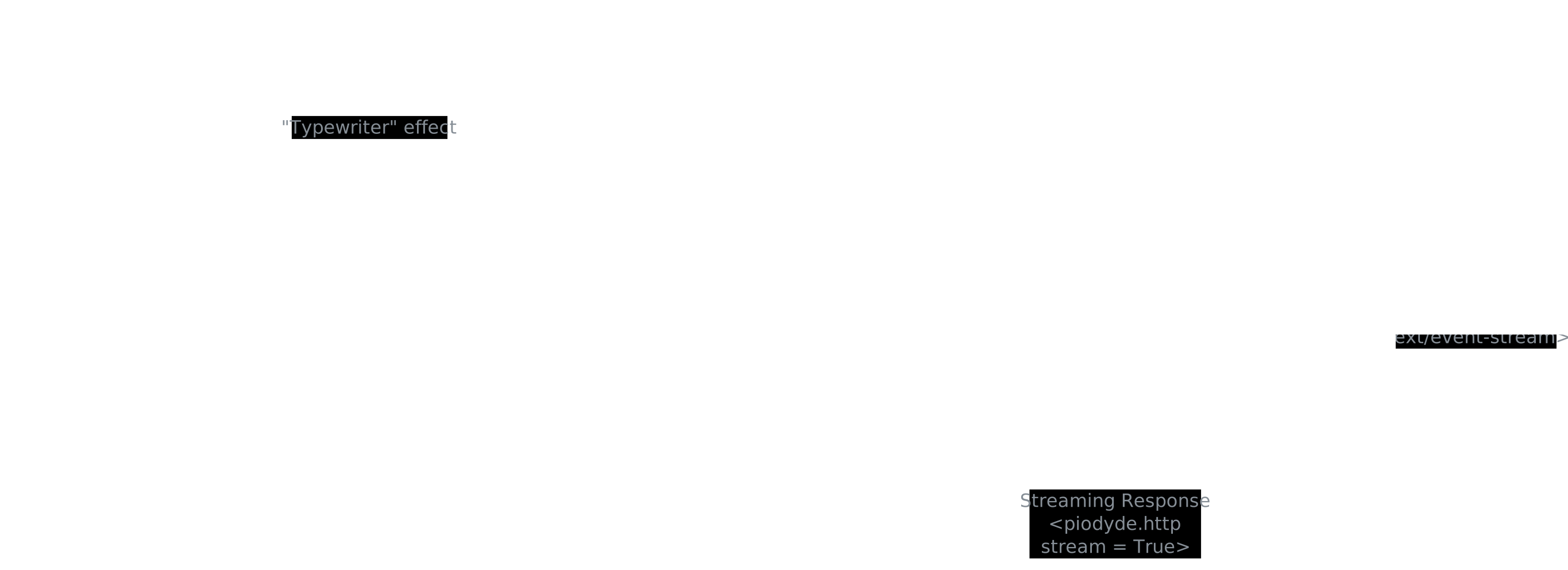
A Gadget.dev-hosted React app inside Shopify Admin, which talks to a Gadget.dev-hosted NodeJS backend. The NodeJS backend then proxies AI requests through a Cloudflare Worker running FastAPI, which queries OpenRouter for streaming LLM responses. The streams are carefully piped back to maintain the streaming nature across all layers.
Embedding a React App within Shopify Admin using Polaris and Gadget.dev
Shopify’s recommended approach for Custom Apps is embedding frontend applications inside their Admin UI using Shopify App Bridge. Still following the recommended approach, Gadget.dev comes with a built-in React Router stack that I use with Shopify Polaris Web Components to match the Shopify look and feel and improve UX consistency.
Responsibilities:
- Use Polaris components for buttons, text fields, layout, …
- Embed the Shopify Custom App via Gadget.dev frontend URL to render the app.
- Handle authentication and session through Shopify App Bridge.
Embedding React with Polaris Web Components is essential for consistent styling and Shopify-approved UI. And required for apps reaching for the “Built for Shopify” badge.
Gadget.dev for NodeJS Backend, API Proxy and Response Streaming
The Gadget.dev-hosted NodeJS app functions as the backend for the Shopify Custom App. It is responsible for receiving requests from the frontend, managing authentication, and orchestrating calls to the AI services indirectly.
To display the AI-generated text with a typewriter effect, the backend returns a readable stream to the React app. This approach allows incremental UI updates as the AI text generates rather than waiting for a full response.
Key points:
- Serve readable streams over REST API to frontend using Gadget.dev HTTP routes.
- Convert FastAPI downstream Server Sent Events to NodeJS readable streams.
- Keep latency low by streaming data progressively.
Using Gadget.dev simplifies managing NodeJS infrastructure and allows straightforward API routing with streaming support.
FastAPI for LLM Interaction, hosted on a Cloudflare Worker
Since Python is the de facto standard ecosystem for AI development, the actual AI service is a FastAPI application running on a Cloudflare Worker, while the rest of the Shopify Custom App remains in NodeJS.
This FastAPI app is lightweight and serves as a proxy to OpenRouter for AI queries. It supports Python async streaming responses and converts OpenRouter’s streaming output into Server Sent Events (SSE) to forward to the NodeJS backend.
Trade-offs:
- Cloudflare Workers are ideal for edge deployment and reduce latency (therefore inference speed feeling).
- FastAPI provides async support and easy SSE stream wrapping.
- However, Workers run Python via Pyodide, which limits native dependency usage and flexibility.
Despite these constraints, deploying the AI call layer as a FastAPI inside a Cloudflaire Worker provides a clean separation and scalability potential.
Streaming through OpenRouter to Preserve Typewriter-style Output
The OpenRouter platform returns Python streaming responses, which are essential for the frontend typewriter effect.
Data flow detail:
- React app sends the user input to the Gadget.dev NodeJS backend.
- Backend calls FastAPI app in the Cloudflare Worker.
- FastAPI calls OpenRouter’s LLM and sends its response back as Server Sent Events.
- NodeJS backend adapts SSE to a ReadableStream the React app consumes.
Limitations and Future Choices
The chatbot currently lacks context memory and proper Markdown parsing, necessary for richer conversations and formatting. Implementing these features is on the roadmap.
For hosting, Cloudflare Workers simplifies deploying the FastAPI app (thanks to Wrangler) but have constraints due to underlying Pyodide. Moving to a more traditional cloud provider like Render could ease Python environment management and allow richer dependencies.
Thoughts on the Architecture Decisions
This layered approach balances Shopify UI integration, streaming response handling, and AI service decoupling. Proxying all AI calls through a dedicated FastAPI streaming service enforces industry-standard and facilitates implementing streaming capabilities of the underlying LLM.
The use of end-to-end readable streams creates a natural incremental UI.
Overall, this highlights how integrating AI chatbots inside existing SaaS platforms requires careful orchestration of frontend, backend, and AI layers, with streaming as a fundamental enabler for responsive UX.