Keeping up with Shopify’s technical updates is critical for me as a developer. But I kept forgetting to check the changelog regularly, which meant missing out on relevant new features or fixes. I needed a lightweight, automated way to get this information delivered directly to my inbox on a weekly basis.
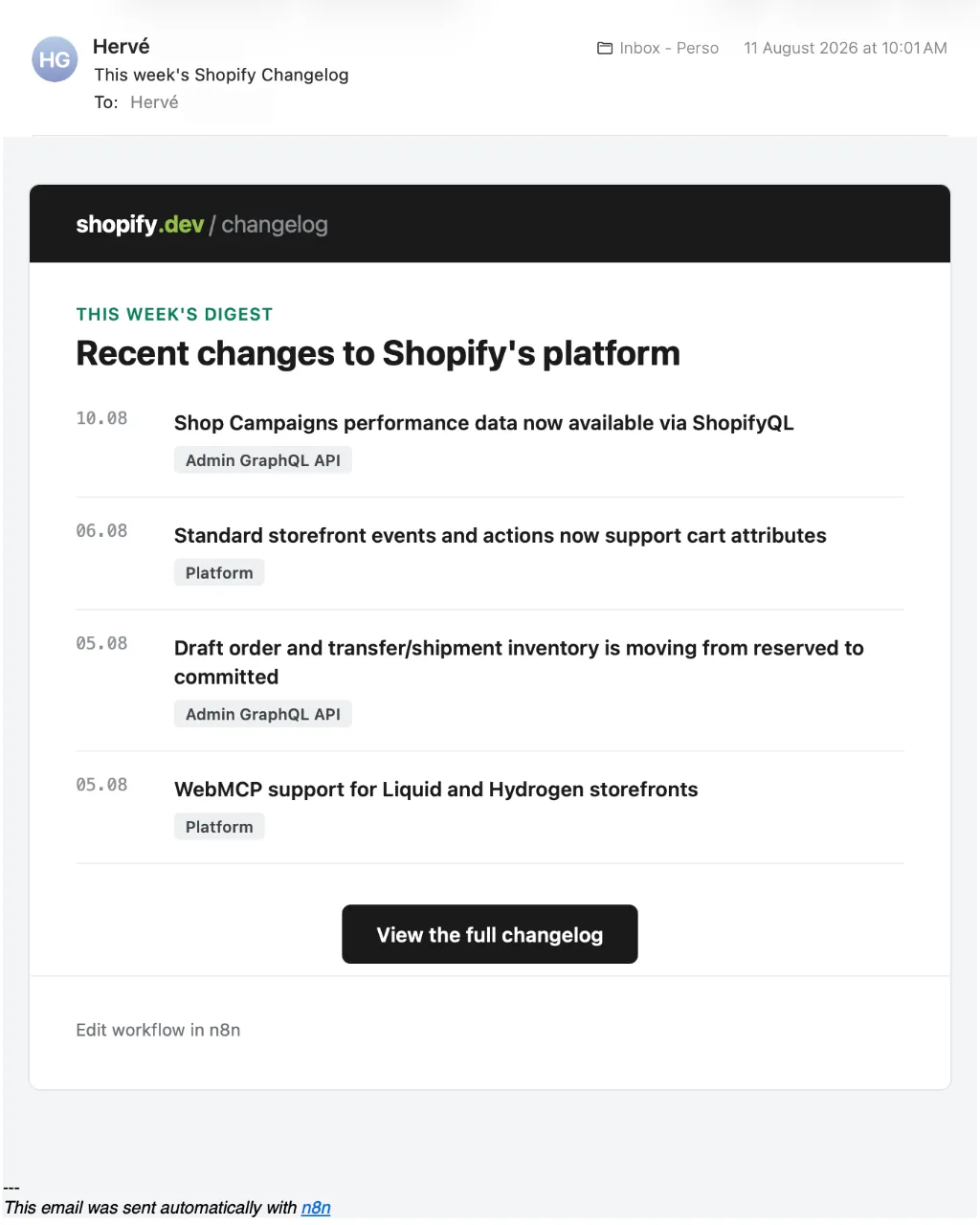
Here are the main constraints and requirements shaping my approach:
- Simplicity: I did not want a complex setup that required maintaining infrastructure.
- Accuracy: The changelog items needed to be filtered precisely by calendar date, not by approximate time intervals.
- Format: The updates had to be formatted clearly for quick reading in email.
- Cost and control: Preference for using an open-source LLM model rather than a proprietary one.
- Reliability: A weekly schedule trigger to ensure consistent delivery.
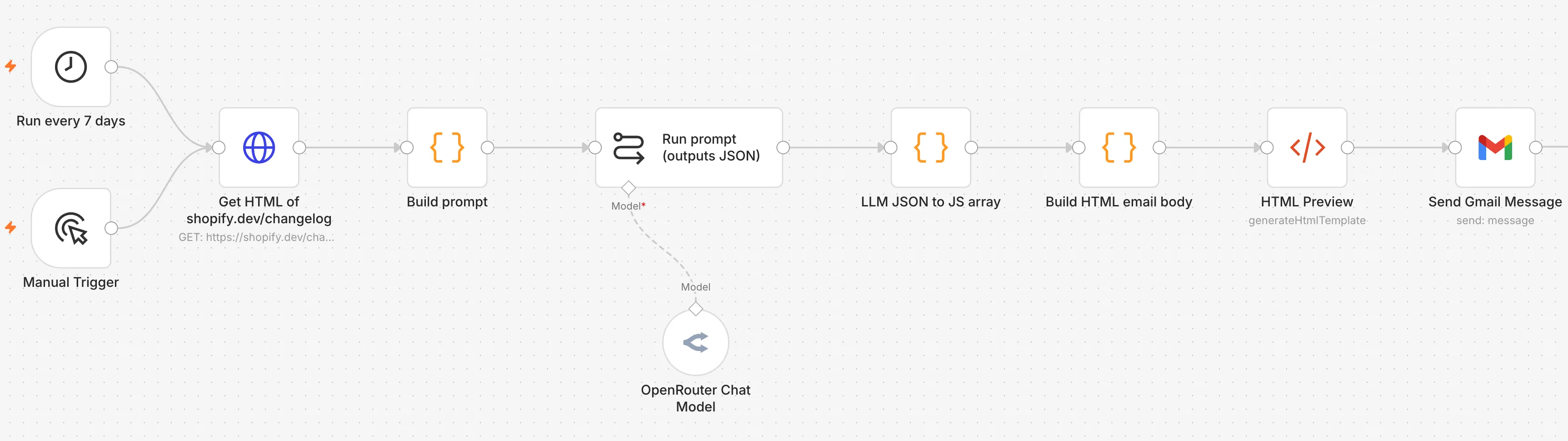
To solve this, I built a straightforward workflow in n8n that pulls the Shopify developer changelog page, extracts the last 7 calendar days’ entries, formats them into an HTML email, and sends it to me via Gmail. The workflow leverages the open-source GPT-OSS 20B model through OpenRouter for parsing and JSON extraction.
Why I used a weekly schedule trigger
I wanted to keep this automated and hands-free. Setting a schedule node in n8n to trigger every 7 days ensured the workflow runs exactly once per week, on the same weekday. This fits the natural cadence of typical Shopify platform updates and aligns well with my own review habits.
Key attributes of the schedule trigger:
- Runs once every 7 days, no drift correction needed
- Simple to configure and reliable within n8n
- Avoids complex external scheduling dependencies
Fetching the raw changelog HTML
For data acquisition, I used the n8n HTTP Request node to fetch the full changelog page HTML from https://shopify.dev/changelog. This proved straightforward since the dev changelog is publicly accessible and HTML structured.
Critical design points:
- No API available for changelog, so HTML scraping is necessary
- No authentication needed, which simplifies credentials management
- The raw page HTML contains all changelog entries needed for parsing
Constructing a precise extraction prompt
Here I employed a Code node to build a detailed prompt for the LLM. The prompt instructs the model to extract changelog entries published within the strictly defined last 7 calendar days (including today). Date boundaries are calculated according to the current date, not intervals in hours, avoiding edge cases.
This custom prompt:
- Explicitly defines the date filtering logic
- Specifies output format as valid JSON with fields: date, title, link, and surface
- Requests only relevant entries within the exact date range
- Includes full URLs as found in the page
- Enforces sorting by newest first
Crafting this prompt required thinking through potential ambiguities in “last 7 days” phrasing and ensuring deterministic, reliable extraction.
Here is the prompt I used:
Extract the Shopify developer changelog entries from the provided webpage and return them as a JSON array.

## Current date

The current date is: {{CURRENT_DATE}}

## Date filtering

Include **only changelog entries published within the last 7 calendar days, inclusive of today**.

Calculate the date range as follows:

* start_date = {{CURRENT_DATE}} minus 6 calendar days
* end_date = {{CURRENT_DATE}}
* Include entries where start_date <= entry_date <= end_date
* Do not include entries older than start_date
* Do not include entries dated in the future

Do not interpret "last 7 days" as an approximate duration such as 168 hours. Use the calendar dates shown on the changelog.

## Output format

Return **only valid JSON**. Do not include Markdown, code fences, explanations, comments, or any text before or after the JSON.

The output must be a JSON array. Each changelog entry must have exactly these four fields:

[
  {
    "date": "YYYY-MM-DD",
    "title": "Changelog title",
    "link": "https://shopify.dev/...",
    "surface": "The surface of the changelog line"
  }
]

### Field requirements

* date: The publication date of the changelog, normalized to YYYY-MM-DD.
* title: The exact changelog title as displayed on the Shopify changelog page.
* link: The URL linking to the detailed changelog entry. Use the actual link from the webpage; do not construct or guess URLs.
* link: Always include the https://shopify.dev domain before the actual relative changelog path

## Extraction rules

1. Inspect all available changelog entries on the page, not just the first few.
2. Filter entries by the date range calculated above.
3. Include every entry that falls within the range.
4. Exclude every entry outside the range.
5. Preserve the changelog's displayed titles exactly.
6. Use the detail-page URL associated with each entry.
7. Keep summaries concise, preferably 1–2 sentences.
8. Do not merge multiple changelog entries into one object.
9. Do not invent missing information.
10. If there are no entries in the 7-day range, return an empty array: \`[]\`.
11. Sort the resulting entries by date descending, newest first.
12. Ensure the final response is valid, parseable JSON.

The provided webpage content is:
{{WEBPAGE_CONTENT}}
Using the open-source GPT-OSS model via OpenRouter
Instead of a proprietary large language model, I chose the open-source GPT-OSS 20B model. OpenRouter serves as a gateway to this LLM, providing an API-compatible interface.
My rationale:
- Cost control: no need to pay for a fancy frontier model
- Sufficient language understanding power to parse HTML snippets and extract data accurately
Integrating OpenRouter with n8n’s LLM Chain node made this use seamless.
Converting the LLM JSON output into actionable data
The LLM outputs a JSON string representing an array of changelog entries. To turn this into usable workflow data, I added a Code node that parses the JSON and maps each entry into individual n8n items.
This step:
- Handles JSON parse errors safely
- Normalizes the output for further processing
Formatting the HTML email content
I opted to create a fully-built HTML email body for better readability and presentation. A Code node generates a table of changelog entries, formatting dates, titles, and surfaces with inline CSS and semantic HTML structure.
Considerations included:
- Styling compatible with major email clients
- Responsive design for mobile screens
- Clear clickable links and distinct date columns
This step takes the structured JSON and turns it into a professional weekly changelog digest.
Sending the email via Gmail node
Finally, I connected the workflow output to an n8n Gmail node that delivers the email to my address. Integrating with Gmail OAuth2 is straightforward in n8n and ensures secure sending.
I can also trigger the workflow manually for testing or immediate updates if needed.
Balancing simplicity and flexibility
This workflow may seem over-engineered just to fetch and email a changelog page. But using the LLM to parse HTML and extract precise updates based on calendar dates proved more reliable than brittle XPath or regex scraping. Also, by the way, the purpose of this journal is to learn and this was a good exercise!
This small automation saves me the mental overhead of remembering to check weekly updates. It also served as a good n8n practice project to blend scheduling, API calls, LLM-driven data extraction, and formatted email construction.
Looking back, this project reinforced that good automation balances simplicity in flow design with the right abstractions for tasks like natural language-based HTML parsing. It also reminds me that even modest automations can provide consistent value when thoughtfully designed around real user habits and constraints.